Kubernetes: What It Is, What It's For, and How to Set Up Your First Local Cluster

Updated March 2026: This article has been revised to reflect the latest changes in Kubernetes v1.35, including the transition from Ingress to Gateway API and updates across the ecosystem.
What is Kubernetes?
Imagine you have an app that works perfectly on your machine inside a Docker container. All good, right? Now imagine that app needs to run in 10, 50, or 500 copies because you have thousands of users. Who takes care of spinning up all those copies, distributing the traffic, restarting the ones that crash, and updating without downtime? That’s where Kubernetes (or as friends call it: K8s) comes in.
Kubernetes is an open source container orchestrator, originally created by Google and now maintained by the Cloud Native Computing Foundation (CNCF). Think of it as a conductor of an orchestra: each container is a musician, and Kubernetes makes sure everyone plays in harmony, at the right time, and nobody stays silent.
What is it really for?
Let me put it this simply. Kubernetes lets you:
- Automatically scale your app when traffic increases (and scale down when it drops).
- Self-healing: if a container dies, Kubernetes detects it and spins up a new one automatically.
- Rolling updates: update your app without users noticing any downtime.
- Load balancing: distribute traffic across the copies of your app.
- Declarative management: you define in a YAML how you want your infrastructure to look, and K8s takes care of making it happen.
- Service discovery: your services find each other without you having to manually configure IPs.
In short: Kubernetes turns a bunch of machines into a single platform where you can deploy and manage your apps reliably.
Docker vs Kubernetes: Aren’t they the same thing?
This is the most common confusion when you’re starting out. The short answer: no, they’re complementary. It’s like comparing a brick to an architect: Docker builds the brick (the container), and Kubernetes is the architect that designs and manages the entire building.
Key differences
| Aspect | Docker | Kubernetes |
|---|---|---|
| Main role | Build and run containers | Orchestrate and manage containers at scale |
| Unit of work | Individual container | Pod (one or more containers) |
| Scaling | Manual, on a single host | Automatic, across multiple nodes |
| Self-healing | Doesn’t have it | Restarts and replaces crashed containers |
| Networking | Local host network | Cluster network with DNS and load balancing |
| Updates | Manual | Automatic rolling updates with rollback |
| Configuration | Dockerfile, docker-compose.yml | YAML manifests (Deployments, Services, Gateway API, etc.) |
Docker Architecture
Docker has a simple architecture: a client (CLI) that talks to a daemon (dockerd) on a single machine.
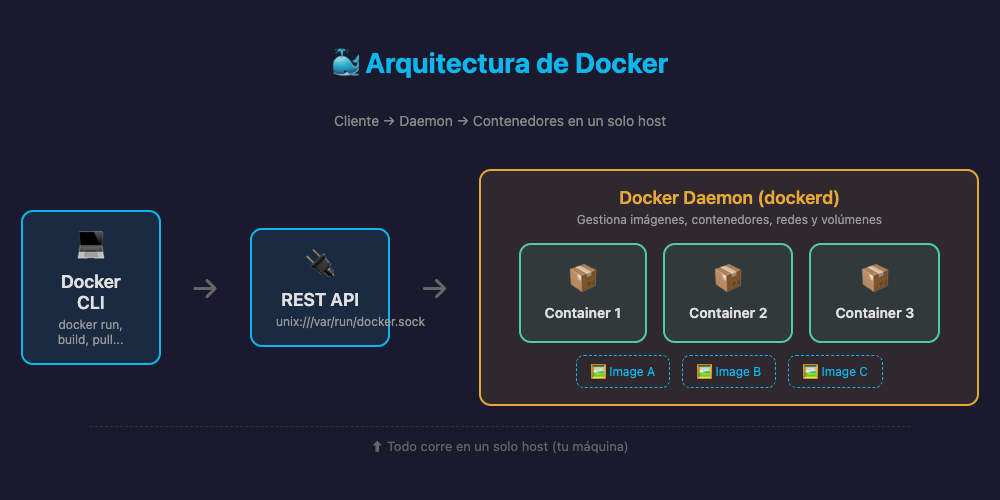
Docker: Client → Daemon → Containers on a single host
Kubernetes Architecture
Kubernetes is a distributed system with two types of components:
Control Plane (the brain):
- API Server: the front door — everything goes through here.
- etcd: the cluster’s database (stores all state).
- Scheduler: decides which node to run each pod on.
- Controller Manager: ensures the actual state matches the desired state.
Worker Nodes (the muscles):
- kubelet: the agent on each node that runs the pods.
- kube-proxy: handles network rules.
- Container Runtime: the engine that runs the containers (containerd, CRI-O).
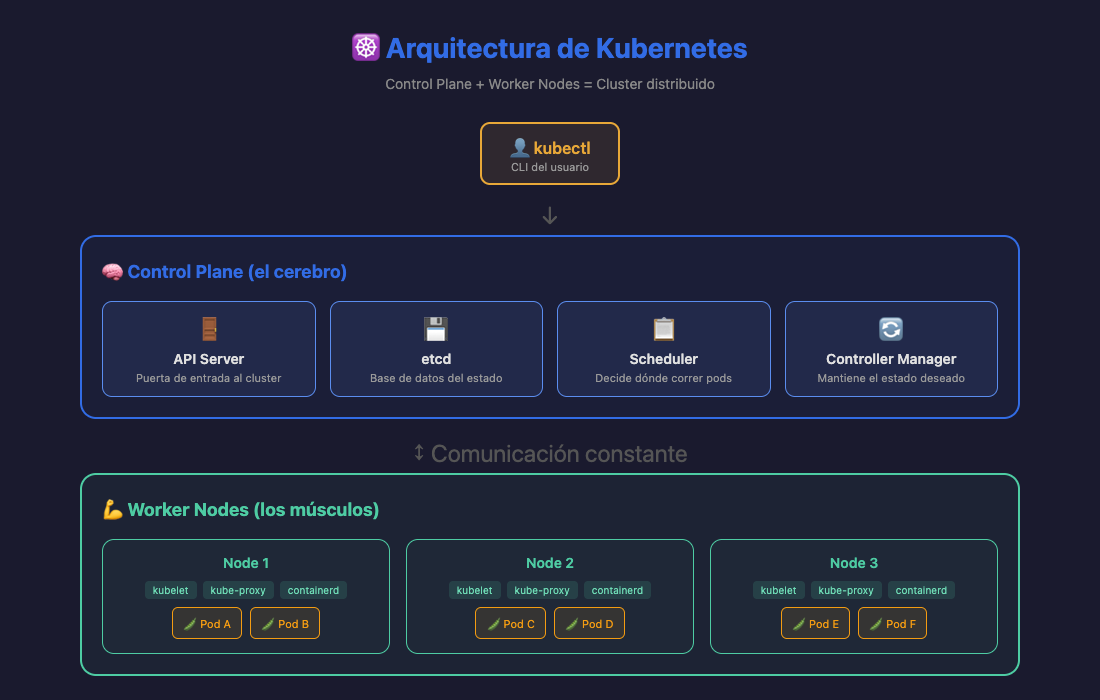
Kubernetes: Control Plane + Worker Nodes = distributed cluster
Who offers Kubernetes in the cloud?
If you don’t want to manage the cluster yourself, cloud providers offer managed Kubernetes. This means they take care of the Control Plane and you only worry about your apps:
| Provider | Service | Notes |
|---|---|---|
| Amazon Web Services | EKS (Elastic Kubernetes Service) | The most widely used in the market |
| Google Cloud | GKE (Google Kubernetes Engine) | The most mature, created by the inventors of K8s |
| Microsoft Azure | AKS (Azure Kubernetes Service) | Free control plane, integration with the Microsoft ecosystem |
| Oracle Cloud | OKE (Oracle Kubernetes Engine) | Good enterprise option |
| DigitalOcean | DOKS | Simple and developer-friendly |
| Alibaba Cloud | ACK | Strong presence in Asia-Pacific |
| Red Hat | OpenShift | Enterprise-grade, hybrid and multi-cloud |
Setting up your first local cluster
Before spending money in the cloud, the best thing to do is practice on your machine. We’re going to create a cluster with Kind (Kubernetes in Docker), a tool that spins up K8s clusters using Docker containers as nodes.
Prerequisites
- Docker running (or OrbStack on macOS, which is much lighter).
- kubectl installed (the CLI for interacting with Kubernetes).
- Kind installed.
On macOS (with OrbStack + Kind)
OrbStack is an ultralight alternative to Docker Desktop on macOS. It uses less RAM, starts faster, and has native Kubernetes integration. It’s my recommendation for development on Mac.
1. Install OrbStack
Download it from orbstack.dev or with Homebrew:
brew install orbstack2. Install kubectl and Kind
brew install kubectl kind3. Create the cluster
kind create cluster --name mi-clusterThis creates a single-node cluster. If you want something more realistic with multiple nodes, create a configuration file:
# kind-config.yaml
kind: Cluster
apiVersion: kind.x-k8s.io/v1alpha4
nodes:
  - role: control-plane
  - role: worker
  - role: worker
And then:
kind create cluster --name mi-cluster --config kind-config.yaml4. Verify everything works
# List the cluster nodes
kubectl get nodes

# Check the Kubernetes version
kubectl version

# List the namespaces
kubectl get namespaces
On Windows (with Docker Desktop + Kind)
If you’re on Windows, the path is a bit different but just as straightforward.
1. Install Docker Desktop
Download Docker Desktop and install it. Make sure to enable WSL2 as the backend during installation.
2. Install kubectl
Open PowerShell as administrator:
choco install kubernetes-cliOr download it directly:
curl.exe -LO "https://dl.k8s.io/release/v1.35.2/bin/windows/amd64/kubectl.exe"3. Install Kind
choco install kindOr manual download:
curl.exe -Lo kind-windows-amd64.exe https://kind.sigs.k8s.io/dl/v0.31.0/kind-windows-amd64
Move-Item .\kind-windows-amd64.exe C:\Windows\kind.exe
4. Create the cluster
kind create cluster --name mi-cluster5. Verify
kubectl get nodes
kubectl version
kubectl get namespacesSeeing our cluster in action
Once the cluster is created, let’s verify everything is in order.
Cluster nodes
kubectl get nodes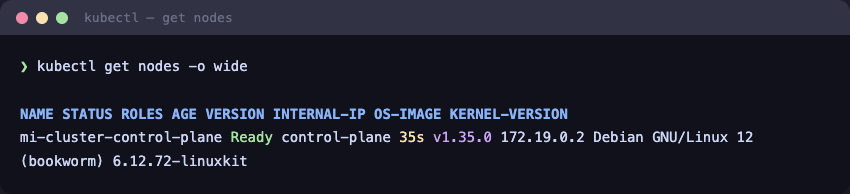
Listing Kind cluster nodes
Namespaces
Namespaces are like “folders” inside your cluster to organize resources. Kubernetes creates several by default:
kubectl get namespaces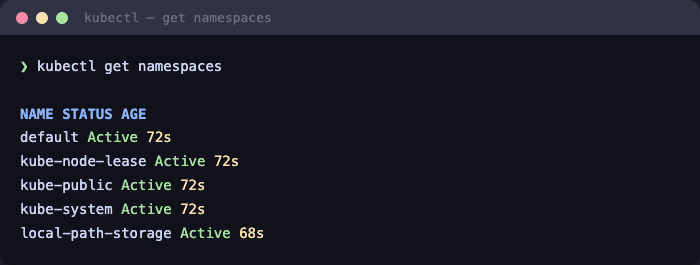
Default namespaces in a Kubernetes cluster
Kubernetes version
kubectl version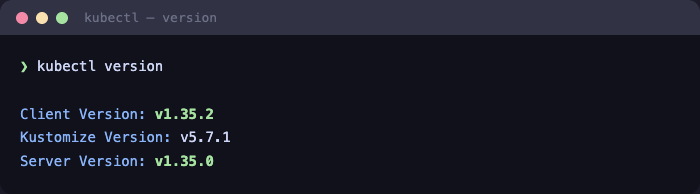
Client and server Kubernetes version
Summary
Let’s recap what we learned:
- Kubernetes is a container orchestrator that manages your apps at scale.
- Docker and Kubernetes are complementary: Docker builds containers, Kubernetes orchestrates them.
- Cloud providers offer managed Kubernetes (EKS, GKE, AKS) so you don’t have to manage the cluster yourself.
- With Kind + OrbStack (macOS) or Kind + Docker Desktop (Windows) you can have a local cluster up and running in minutes to practice.
In the next post we’ll go further: we’ll deploy a real application on our cluster and learn about Deployments, Services, and everything you need to get your first app running on Kubernetes. See you there!
Did you enjoy this article? Share it with someone who’s getting started with Kubernetes. And if you have questions, leave me a comment!